Gitlab to github mirroring
Scenario: mirror a main branch automatically to Github; repo on Github is owned by an organization you’re a member of.
- Gitlab docu:
- Repository mirroring | GitLab
- Specifically our caese: Push mirroring | GitLab
- Troubleshooting repository mirroring | GitLab
- Repository mirroring | GitLab
- Other:
- SSH + key auth: Mirror gitlab to github over ssh | Mees van Dongen
Basics
Gitlab:
- settings -> repository -> mirroring.
- The UX there is abysmal.
- When entering the fields, if there’s an error and you submit it refreshes the page and you have to insert everything all over again.
- Seeing errors:
- Any errors you’ll see as error there, hover over the red thing to get the error in the tooltip (idiotic.)
- And you have to refresh the page to get it to update.
- Refreshing of course closes all the sub-menus and you have to open it again.
- Errors take time to appear….
-
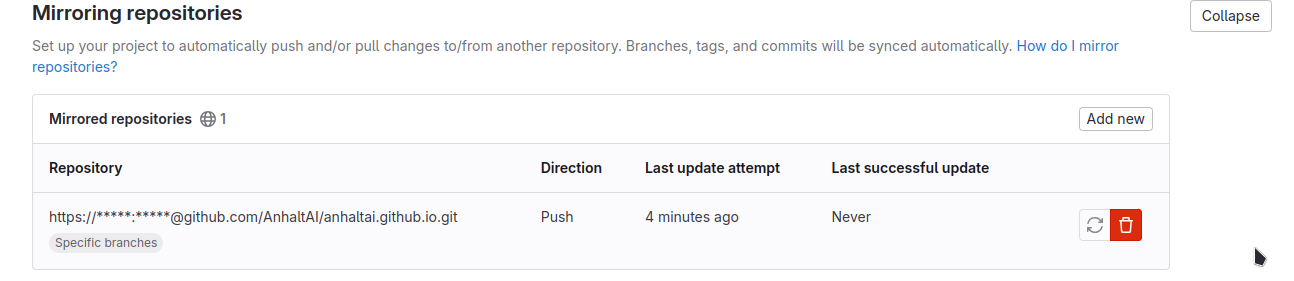 at some point it’ll either succeed or fail, just wait. If refreshing doesn’t work — it’s in progress/updating.
-
- Can’t find a way to modify a mirroring config, you have to delete and re-create?!
Attempt 1: using a PAT + HTTPS
-
Github:
- create the PAT from your user, not org
- Dev. settings! (the documentation lies) -> PAT -> fine-grained tokens
- RESOURCE OWNER has to be the organization!
- Generate new token etc.
- TODO think about permissions.
-
Gitlab:
- I tried to do repo accessible as HTTPS:
https://github.com/GROUP/PROJECT.git - Username: my Github username. Password: the PAT I generated.
- It creates a URI in the style of https://myuser:myPAT@github.com/…
- I tried to do repo accessible as HTTPS:
-
But it fails:
13:get remote references: create git ls-remote: exit status 128, stderr: "fatal: unable to access 'https://github.com/orga/repo.git/': SSL connection timeout\n".- if I try manually it pull from the URI with user/PAT it remind me that Github has no “no password-based auth” since 2021
- BUT I think it should still work for pulling from apps etc., otherwise what’s the point of a PAT?
-
- bad chars in pass - not my case.
-
Trying with a “classic token”, permisisons: admin orgs.
- same error
Attempt 2
git - Mirroring from GitLab to GitHub - Stack Overflow TL;DR using https://token@github.com/AnhaltAI/anhaltai.github.io.git, set username, empty password -> timeout
attempt 3 SSH
No keys yet, just to see what happens, same error.
ssh://me@github.com:repo.git
Invalid URI?
Let’s try with deploy keys Mirror gitlab to github over ssh | Mees van Dongen
Now that github doesn’t allow password based authentication anymore, it is necessary to use ssh key based authentication methods when setting up a repository mirror.
Oh damn, really?
URI invalid. =>It doesn’t like the semicolon! :
Aaand from the documentation:
- When using the
ssh://protocol, please use the following format:ssh://username@example.com/group/project.git.
OKAY, let’s do this:
ssh://git@github.com/AnhaltAI/anhaltai.github.io.git
I left username not full.
-> works but is quiet.
With a username I can paste the key!
When you push a change to the upstream repository, the push mirror receives it:
- Within five minutes.
- Within one minute, if you enabled Only mirror protected branches.
Aha I can stop waiting 5 mins if do protected branches only? … Why? I have only one branch anyway?.. Unprotecting main and protecting my temp branch.
13:get remote references: create git ls-remote: exit status 128, stderr: "kex_exchange_identification: read: Connection timed out\r\nbanner exchange: Connection to 140.xxx.xxx.3 port 22: Connection timed out\r\nfatal: Could not read from remote repository.\n\nPlease make sure you have the correct access rights\nand the repository exists.\n"
Ha.
Does the server even connect to github?
Created this pipeline, running it in gitlab, it works.
image: debian:bullseye-slim

stages:
  - test_ssh

before_script:
  - apt-get update
  - apt-get install -y openssh-client

test_ssh_connection:
  stage: test_ssh
  script:
    - mkdir -p ~/.ssh
    - echo "$SSH_PRIVATE_KEY" > ~/.ssh/id_rsa
    - chmod 600 ~/.ssh/id_rsa
    - echo "$SSH_KNOWN_HOSTS" > ~/.ssh/known_hosts
    - ssh -T git@github.com
$ ssh -T git@github.com

[172](https//)Warning: Permanently added the ECDSA host key for IP address 'xxx' to the list of known hosts.

[173](https//)Hi AnhaltAI/anhaltai.github.io! You've successfully authenticated, but GitHub does not provide shell access.
Real SSH way
Way 5: the main thnig but explicit host key for github.
ssh-keyscan github.com but also github provides its own keys: GitHub’s SSH key fingerprints - GitHub Docs that should be added to .ssh/known_hosts.
Trying again, SSH, manually provided host keys for github, adding my username, etc. etc. etc.

 Liars.
And at the end same:
13:get remote references: create git ls-remote: exit status 128, stderr: "kex_exchange_identification: read: Connection timed out\r\nbanner exchange: Connection to 140.82.121.4 port 22: Connection timed out\r\nfatal: Could not read from remote repository.\n\nPlease make sure you have the correct access rights\nand the repository exists.\n".
More debugging
HTTPS:
- git clone https://myusername:myfinegrainedtoken@github.com/myteam/mirepo.git works locally
Works locally?
I have a .ssh/config!
But:
git ls-remote ssh://git@ssh.github.com:443/AnhaltAI/anhaltai.github.io.git
works if I set git config to use the same key as gitlab runner
In a runner this works as well (no ssh)!
$ git ls-remote ssh://git@github.com/AnhaltAI/anhaltai.github.io.git

[90](https://gitlab.hs-anhalt.de/ki/anhaltai-website/-/jobs/30368#L90)
Best description of the problem
-
The pipeline works: I provide it the github-provided known-hosts and a generated private key, and make github accept that pub. key. https://gitlab.hs-anhalt.de/ki/anhaltai-website/-/jobs/30360
-
SSH+publickey and HTTPS with various PATS etc. tested
-
Mirroring fails, always with timeout errors. Both HTTPS and SSH have timeouts.
-
locally this works: git clone https://pchr8: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@github.com/AnhaltAI/anhaltai.github.io.git
-
why does mirroring fail with network issues while runners are OK?
-
in a runner this works:
git ls-remote ssh://git@github.com/AnhaltAI/anhaltai.github.io.githttps://gitlab.hs-anhalt.de/ki/anhaltai-website/-/jobs/30368
Fuck this, I’ll do CI/CD.