LaTeX best practices and compression
Use 260330-1938 LaTeX paper final checklist at the end!
- References
EDIT: this is becoming a more generic thingy for everything I’d ever need to refer to when writing a paper, TODO clean this at some point.
Resources – DREAM Lab links to https://dream.cs.umass.edu/wp-content/uploads/2020/04/Tips-and-Best-Practices.pdf. Until I set up a system to save PDF info, I’ll paste it as screenshots here:
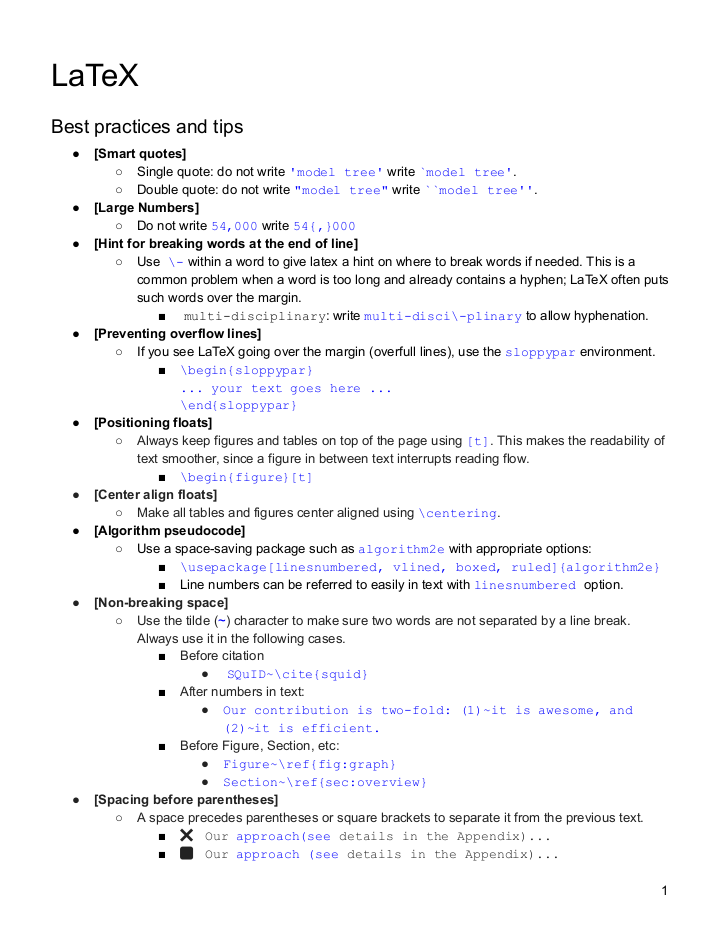
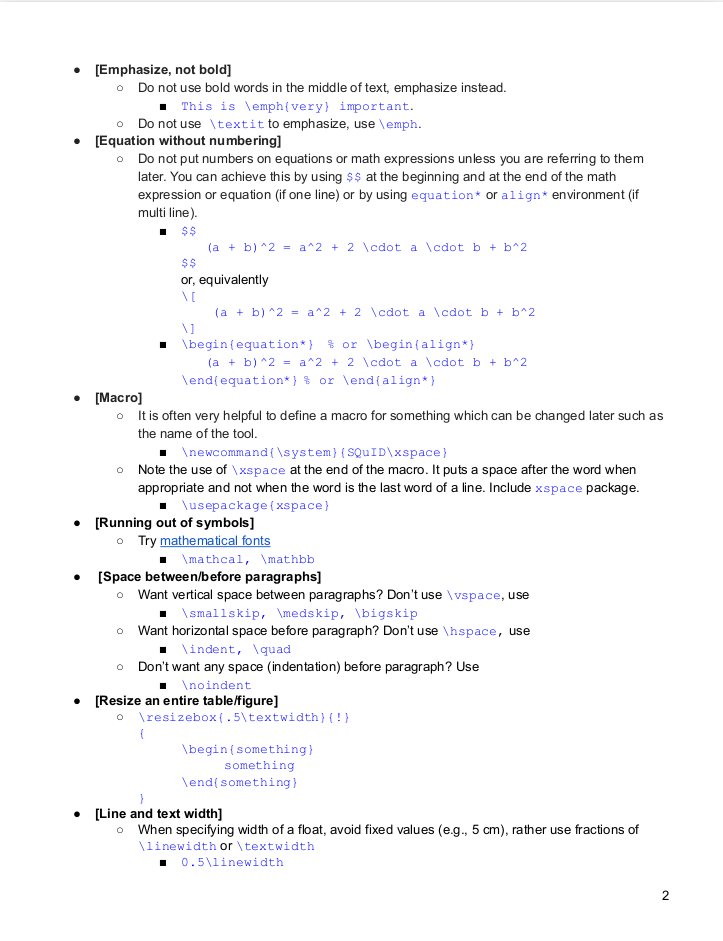
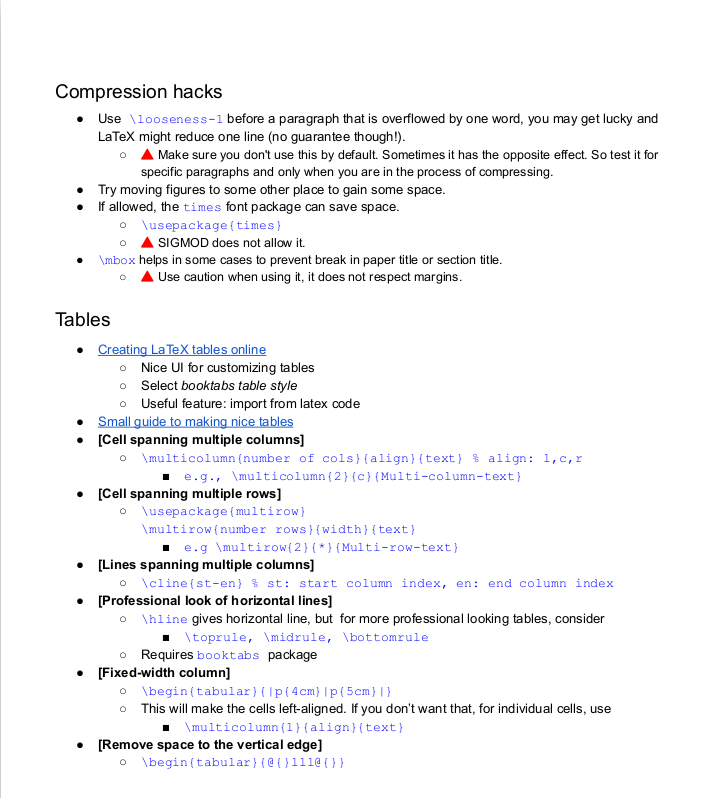
ChatGPT summarized the relevant pages of the PDF file thus, but didn’t do it well, mostly rewriting myself:
General Formatting
\emph{}is better than\textit{}always, and supports nesting.- Smart Quotes: Use `x’ and ``x’’ for single and double quotes respectively.
- Large Numbers: Write large numbers as 54{,}000.
- Word Breaking: Use - to suggest hyphenation points in long words, including ones that already have hyphens inside them. Such words are likely to go over margins etc.:
multi-discipli\-nary - Overflow Lines:
\begin{sloppypar}...for paragraphs where latex goes over the margin. - Float Positioning: Place figures and tables at the top of the page for readability:
\begin{figure}[t] - Center Align Floats: Use
\centeringfor aligning tables and figures.
Specific Elements
- Non-Breaking Space: Use the tilde (~) to keep words together, including always
- before citations:
sth~\cite{whatever} - after numbers in text
- before figure/section references
- before citations:
- Emphasize vs. Bold: Prefer
\emphover bold or\textit.
Macros
- Macros: Create macros for things that will be changed later, such as DATASET NAMES, or things tedious to type like MODEL NAMES .
\newcommand{\system}{SQuID\xspace}for auto-space\xspaceguesses whether to add a space or not,\usepackage{xspace}. May fail in unexpected places.- Explicit is always better:
\system{}or\system\manually adds a space.
\newcommand{\llama}{Llama-3.3-70B-Instruct}
\newcommand{\mistral}{Mistral-Small-3.1-24B-Instruct-2503}

Two models, \llama{} and \mistral. % note spacing!
Spacing and Sizing
- Paragraph Spacing: Use
\smallskip,\medskip, and\bigskip, instead of\vspace - Line and Text Width: Use fractions of
\linewidthor\textwidth. - Resizing Tables/Figures: Use
\resizeboxwith appropriate dimensions.
Compression hacks
- (see pictures)
- Make spaces smaller around lists:
\begin{itemize}
  \setlength{\itemsep}{0pt}
  \setlength{\parskip}{0pt}
huggingface.cocan becomehf.coin footnotes!
Paper writing hacks
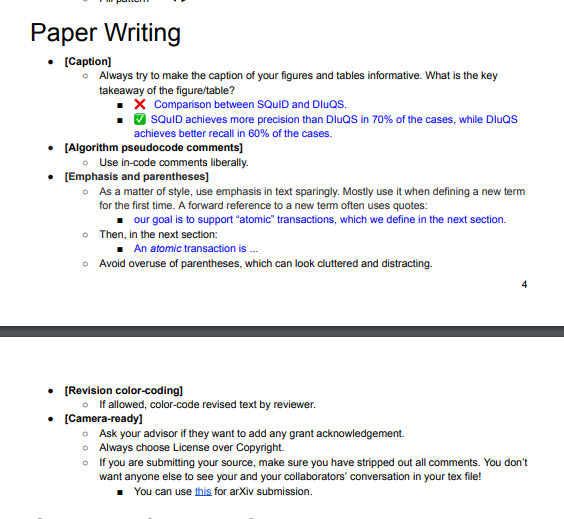
Even more
Non-breaking spaces
best practices - When should I use non-breaking space? - TeX - LaTeX Stack Exchange lists ALL the places where Knuth wanted people to put nonbreaking spaces, incl:
1)~one 2)~twoDonald~E. Knuth1,~2Chapter~12
Less obvious and not from him:
I~am
Also:
- before all cites, refs
- … and inlined equations
Citations
- ChatGPT says that citations should come before footnotes to prioritize the scholarly source over unimportant info.
- Citations go before the last period of the sentence, but within parentheses.
- Natbib reference sheet:
\citep{}aka\cite{}for inside Parenthesesthing *(Bob, 2043)*\citealp{}:sentence (as *Bob, 2032*, said)
\citet{}for citations inside Text:*Bob (2032)* says that ...\citealt{}for removes parentheses:*Bob 2032*(no comma!)
References (cleveref)
\cref>\autoref> vanilla\ref\usepackage[capitalise, nameinlink, noabbrev]{cleveref}is usually what I want- nameinlink makes
Figure ...linked as well, not just the number - noabbrev for
Figureinstead ofFig. - capitalise for uppercase by default, without it
\Crefdoes it manually.\Creffor beginning of sentence\crefotherwise is good karma regardless ofcapitalise
- nameinlink makes
- Appendixes will be called Appendix if you add
\crefalias{section}{appendix}before they start4 - Documentation:
Other bits
-
I sometimes write
and around ~50%forgetting that~is a nbsp — hard to catch when reading the text. -
As when writing code I like to add some
assert False(or a failing test) so that I know where I stopped the last time,\latexstopcompiling hereis a neat way to make sure I REALLY finis ha certain line I started but not finished. -
\clearpage(maybe a couple) for a new page -
Use the
xurlpackage, it’s it’s basicallyurlbut adds neat line breaks.\url{my-long-url-thingy.com}
Useful snippets
My favourite TODO command
% \newcommand{\TODO}[1]{{\color{magenta}\textbf{#1}}}
\newcommand{\TODO}[1]{{\color{magenta}#1}}
EDIT: the todonotes package is a thing!
https://tug.ctan.org/macros/latex/contrib/todonotes/todonotes.pdf
TODO use its much better options
Quick environment for informal lists etc.
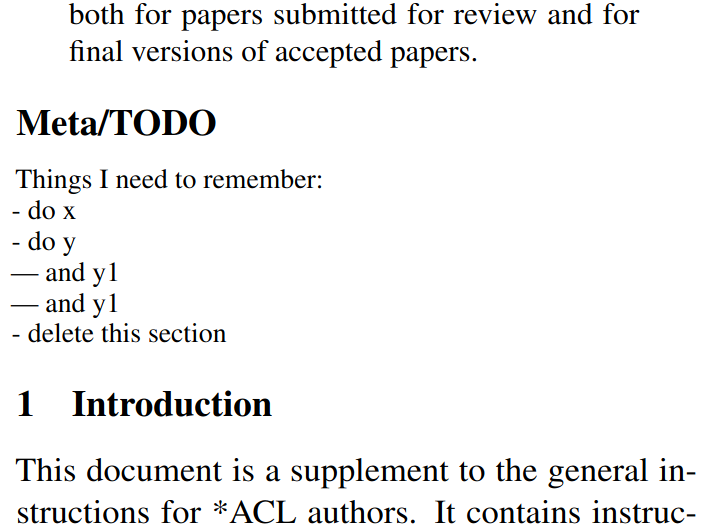
When starting a paper I usually add a first section with references/checklists, that gets deleted before submission. This makes it easy to write
% disables parindent, makes latex follow newlines
\newenvironment{META}{%
    \setlength{\parindent}{0pt}
    \obeylines
	\footnotesize % or not
}{%
    % group closes automatically
}
Sample usage:
\section*{Meta/TODO} \begin{META}
Things I need to remember:
- do x
- do y
--- and y1
--- and y1
- delete this section
\end{META}
\section{Introduction}
Same through groups
\def\TODO{\begingroup
\color{magenta}
\bfseries
}
\def\noTODO{\endgroup}

% then
\TODO here's my text, supports enumerations etc. inside as well! \noTODO Back to normal
Obeylines for simple newlines
(From https://tex.stackexchange.com/a/153540)
\bgroup\obeylines
Here line breaks
are respected.
\egroup
Here they
are not.
Auto titlecaps
(Don’t remember where from)
\usepackage{titlecaps}
\Addlcwords{the and but or nor for a an at by to in on with of}
\let\oldsubsection\subsection
\renewcommand{\subsection}[1]{\oldsubsection{\titlecap{#1}}}
% also section etc.
Saving space
TODO
% remove spacing before itemize
\usepackage{enumitem}

% https://tex.stackexchange.com/questions/23313/how-can-i-reduce-padding-after-figure
% \setlength{\belowcaptionskip}{-2ex} % default is 0
\setlength{\abovecaptionskip}{0pt} % default is 10

% don't change indent
\usepackage[skip=0pt, indent]{parskip}
Circled numbers
\usepackage{circledsteps}

% then for circled 3 do eg.
\Circled{3}
Make wide tables fit in the page
\begin{table*}[t]
\centering
\small
\begin{adjustbox}{max width=\textwidth}
\begin{tabular}{l  c c c c }
Make minted listings use the same font for “Listing” in the caption
\usepackage{caption}

% This ensures lstlisting uses the standard caption style
\captionsetup[lstlisting]{
    format=plain,
    % Adjust labelfont and textfont to match your document class
    % Common options: bf (bold), sc (small caps), it (italic)
    labelfont=bf,
    textfont=normalfont,
    singlelinecheck=false
}
Colored boxes
\usepackage[many]{tcolorbox}
% ...
\begin{tcolorbox}[title=Box title,colframe=darkgray,colback=blue!5!white,arc=0pt,fonttitle=\bfseries]
\end{tcolorbox}
Footnotes in tables
Just use \dag, \ddag and manually add to caption. DON’T FORGET ABOUT THEM!
Symbols
- “The great, big list of LaTeX symbols”(PDF) with an ABSOLUTELY BRILLIANT COVER. h/t to overleaf
- LaTeX/Mathematics - Wikibooks, open books for an open world
Misc
- https://allanj.github.io/blog/2022/paper-writing/ is a page similar to this one, higher abstraction though. Many bits on condensing
TODO / more
- we’ll -> we will
- e.g., i.e.: always preceded by comma and followed by comma
- (in American English, as in ‘for example’, and ’that is’), but not British English.
- Somewhere I read that e.g. has commas if your list of examples has more than one, damn tha twould have been nice :(
-
punctuation - How to force LaTeX not to break the line after a hyphen “-”? - TeX - LaTeX Stack Exchange ↩︎
-
hyphenation - Allow line break, but without inserting a dash - TeX - LaTeX Stack Exchange ↩︎
-
[https://tex.stackexchange.com/questions/119513/cleveref-and-appendix-packages-appendix-referenced-as-section] ↩︎