serhii.net
In the middle of the desert you can say anything you want
-
Day 1633 (22 Jun 2023)
Vaex iterate through groups
Didn’t find this in the documentation, but:
gg = ds.groupby(by=["species"])
lg = next(gg.groups)
# lg is the group name tuple (in this case of one string)
group_df = gg.get_group(lg)
-
Day 1632 (21 Jun 2023)
Zotero web version for better tabs + split view
Web zotero
Looking for a way to have vertical/tree tabs, I found a mention of the zotero web version being really good.
Then you can have multiple papers open (with all annotations etc.) in different browser tabs that can be easily navigated using whatever standard thing one uses.
You can read annotations but not edit them. Quite useful nonetheless!
Split view
PDF reader feature request: open the same pdf twice in split screen - Zotero Forums: View -> Split Horizontally/Vertically!
It’s especially nice for looking at citations in parallel to the text.
Overleaf bits
Shortcuts
vim!
EDIT 2023-12-05 Overleaf has Vim bindings! Enable-able in the project menu. There are unofficially supported ways to even make custom bindings through TamperMonkey
Shortcuts
Kurz und gut
- Ctrl+Enter compiles the project
- Bold/italic work as expected,
<C-b/i>. Same for copypaste etc. - Advanced reference search: is cool.
- Comments:
<C-/>for adding%-style LaTex comments.<C-S-c>for adding Overleaf comments
Bible
Overleaf Keyboard Shortcuts - Overleaf, Online LaTeX Editor helpfully links to a PDF, screenshots here:
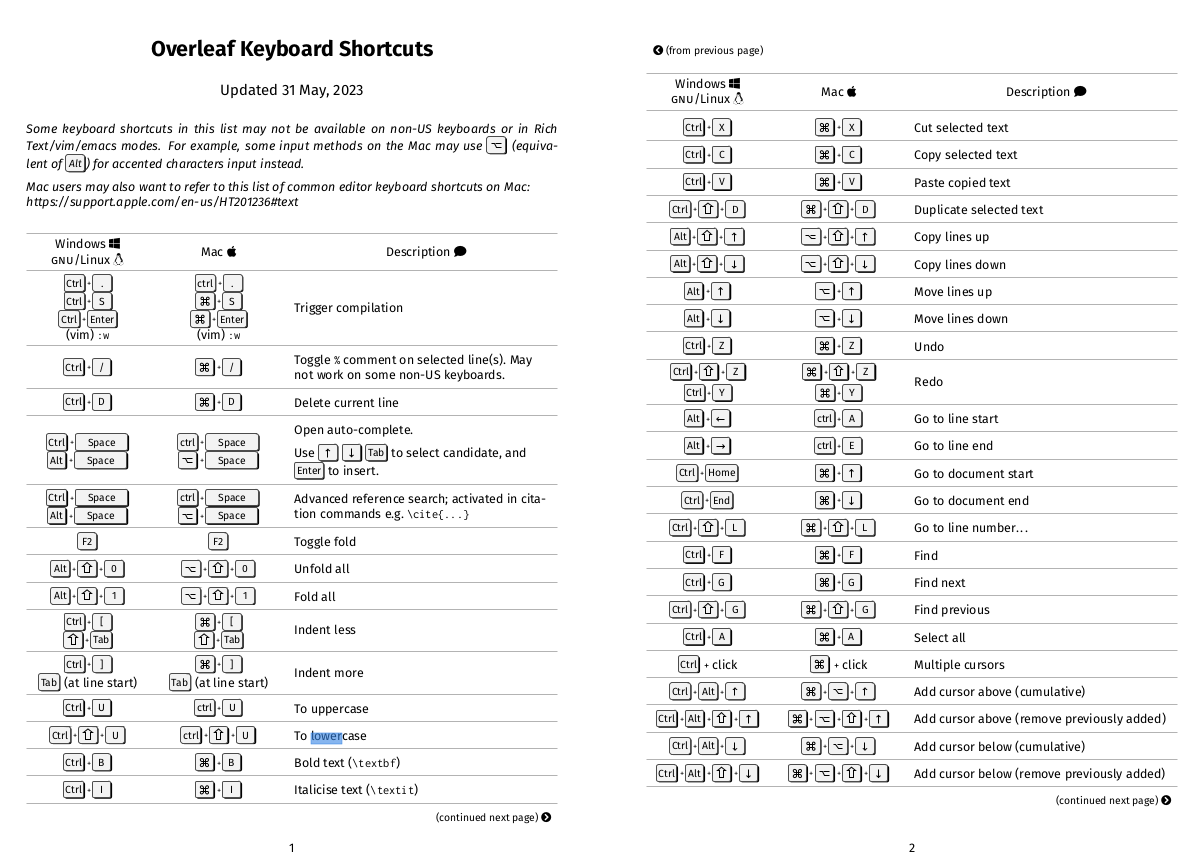
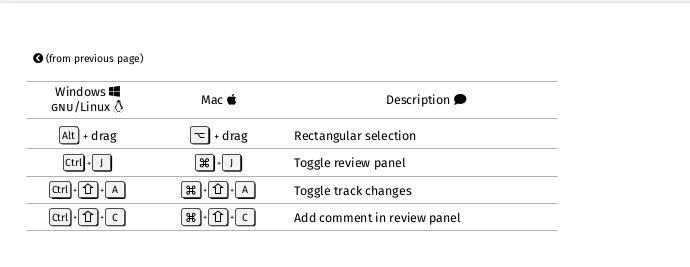
It seems to have cool multi-cursor functionality that might be worth learning sometime.
Templates
Overleaf has a lot of templates: Templates - Journals, CVs, Presentations, Reports and More - Overleaf, Online LaTeX Editor
If your conference’s is missing but it sends you a .zip, you can literally import it as-is in Overleaf, without even unpacking. Then you can “copy” it to somewhere else and start writing your paper.
Bits and pieces
- Renaming the main file to sth like
0paper.texmakes it appear on top, easier to find.
-
Day 1618 (07 Jun 2023)
Timing stuff in jupyter
Difference between %time and %%time in Jupyter Notebook - Stack Overflow
- when measuring execution time,
%timerefers to the line after it,%%timerefers to the entire cell - As we remember1:
- real/wall the ‘consensus reality’ time
- user: the process CPU time
- time it did stuff
- sys: the operating system CPU time due to system calls from the process
- interactions with CPU system r/w etc.
GBIF data analysis
Format
- GBIF Infrastructure: Data processing has a detailed description of the flow
occurrences.txtis an improved/cleaned/formalizedverbatim.txt- metadata
meta.xmlhas list of all colum data types etc.- for all files in the zip!
- columns links lead to DCMI: DCMI Metadata Terms
metadata.xmlis things like download doi, license, number of rows, etc.
- .zips are in Darwin format: FAQ
- Because there are cases when both single and double quotes etc., and neither
'/"asquotecharwork.
df = vx.read_csv(DS_LOCATION,convert="verbatim.hdf5",progress=True, sep="\t",quotechar=None,quoting=3,chunk_size=500_000) - Because there are cases when both single and double quotes etc., and neither
Tools
- GBIF .zip parser lib:
- BelgianBiodiversityPlatform/python-dwca-reader: 🐍 A Python package to read Darwin Core Archive (DwC-A) files.
- Tried it, took a long time both for the zip and directory, so I gave up
- gbif/pygbif: GBIF Python client
- API client, can also do graphs etc., neat!
Analysis
Things to try:
limit number of columns throughpd.read_csv.usecols()1 to the ‘interesting’ ones- optionally take a smaller subset of the dataset and drop all
NaNs - take column indexes from
meta.xml - See if someone already did this:BelgianBiodiversityPlatform/python-dwca-reader: 🐍 A Python package to read Darwin Core Archive (DwC-A) files.
- optionally take a smaller subset of the dataset and drop all
You can add underscores to numbers in Python
TIL that for readability,
x = 100000000can be written asx = 100_000_000etc.! Works for all kinds of numbers - ints, floats, hex etc.!1
Vaex as faster pandas alternative
I have a larger-than-usual text-based dataset, need to do analysis, pandas is slow (hell, even
wc -ltakes 50 seconds…)Vaex: Pandas but 1000x faster - KDnuggets - that’s a way to catch one’s attention.
Reading files
I/O Kung-Fu: get your data in and out of Vaex — vaex 4.16.0 documentation
vx.from_csv()reads a CSV in memory, kwargs get passed to pandas’read_csv()vx.open()reads stuff lazily, but I can’t find a way to tell it that my.txtfile is a CSV, and more critically - how to pass params likesepetcvx.from_ascii()has a parameter called sepe rator?! API documentation for vaex library — vaex 4.16.0 documentation
- the first two support
convert=that converts stuff to things like HDFS, optionallychunk_size=is the chunk size in lines. It’ll create $N/chunk_size$ chunks and concat together at the end. - Ways to limit stuff:
nrows=is the number of rows to read, works with convert etc.usecols=limits to columns by name, id or callable, speeds up stuff too and by a lot
Writing files
- I can do
df.export_hdf5()in vaex, but pandas can’t read that. It may be related to the opposite problem - vaex can’t open pandas HDF5 files directly, because one saves them as rows, other as columns. (See FAQ) - When converting csv to hdf5, it breaks if one of the columns was detected as an
object, in my case it was a boolean. Objects are not supported1, and booleans are objects. Not trivial situation because converting that to, say, int, would have meant reading the entire file - which is just what I don’t want to do, I want to convert to hdf to make it manageable.
Doing stuff
Syntax is similar to pandas, but the documentation is somehow .. can’t put my finger on it, but I don’t enjoy it somehow.
Stupid way to find columns that are all NA
l_desc = df.describe()
# We find column names that have length_of_dataset NA values
not_empty_cols = list(l_desc.T[l_desc.T.NA!=df.count()].T.columns)
# Filter the description by them
interesting_desc = l_desc[not_empty_cols]
Using a virtual environment inside jupyter
Use Virtual Environments Inside Jupyter Notebooks & Jupter Lab [Best Practices]
Create and activate it as usual, then:
python -m ipykernel install --user --name=myenv
- when measuring execution time,