serhii.net
In the middle of the desert you can say anything you want
-
Day 2602 (14 Feb 2026)
Passing complex CLI params to Pydantic settings
Settings Management - Pydantic Validation is nice but doesn’t cover everything.
Passing
Nonethrough CLI- Settings Management - Pydantic Validation
Noneby default b/ccli_avoid_jsonis the default,[]
it will default to “null” if
cli_avoid_jsonisFalse, and “None” ifcli_avoid_jsonisTrue.Fun fact, works inside complex nested JSON flags as well.
Passing complex JSON-like fields incl. tuples
# Assume this
class MySettingsClass(BaseSettings):
    I_am_a_list_of_tuples: list[tuple[str, str, str | None]] = Field(
        default=FILE_PAIRS, validation_alias=AliasChoices("fp", "file_pairs")
    )

FILE_PAIRS = [
    (
        "infer_doc_simplecriteria/pred_doc_simplecriteria.json",
        "merge_gold_simplecriteria/gold_simplecriteria.json",
    ),
    (
        "file2-1",
        "file2-2",
    ),
]
# Passing as a list of lists parses as a tuple # if done wrong the tuple is parsed as a list of strings uv run thing --I-am-a-list-of-tuples \ '"merge_gold_simplecriteria/gold_simplecriteria.json", "infer_doc_simplecriteria/pred_doc_simplecriteria.json"'
-
Day 2600 (12 Feb 2026)
Pydantic dumping model in json mode with serializable objects
TL;DR
pydanticmodel.model_dump(mode=>"json")Serialization - Pydantic Validation
To dump a Pydantic model to a jsonable dict (that later might be part of another dict that will be dumped to disc through
json.dump[s](..)):settings.model_dump() >>> {'ds_pred_path': PosixPath('/home/sh/whatever')} # json.dump... json.dumps(settings.model_dump()) >>> TypeError: Object of type PosixPath is not JSON serializable json.dumps(settings.model_dump(mode="json")) # works!
-
Day 2593 (05 Feb 2026)
JQ notes
Shorthand object contsuction
I kept googling for the syntax but could never find it again.
// long:
'{user: .user, title: .titles}'

// shorthand when key name matches original key name (user==.user)
'{user, title}'
// mix
'{user, title_name: .title}'
From the man page:
You can use this to select particular fields of an object: if the input is an object with “user”, “title”, “id”, and “content” fields and you just want “user” and “title”, you can write
{user: .user, title: .title}
Because that is so common, there´s a shortcut syntax for it:{user, title}.The long version allows to operate on they keys:
{id: .idx, metadata: .metadata.original_idx}
-
Day 2592 (04 Feb 2026)
Simple test to see if VLLM supports structured output
curl 127.0.0.1:8000/v1/chat/completions -s \
  -H "Content-Type: application/json" \
  -d '{
    "model": "/data_pvc2/cache/models--CohereLabs--c4ai-command-r-08-2024/snapshots/96b61ca90ba9a25548d3d4bf68e1938b13506852/",
    "messages": [
      {
        "role": "user",
        "content": "Generate a short analysis in the given JSON schema."
      }
    ],
    "response_format": {
      "type": "json_schema",
      "json_schema": {
        "name": "analysis_schema",
        "schema": {
          "type": "object",
          "properties": {
            "summary": { "type": "string" },
            "importance_score": { "type": "number" },
            "key_points": {
              "type": "array",
              "items": { "type": "string" }
            }
          },
          "required": ["summary", "importance_score", "key_points"],
          "additionalProperties": false
        },
        "strict": true
      }
    }
  }' | jq . > /tmp/out
Sample otuput:
{
  "id": "chatcmpl-9c3932339c7d4e1bace32c24ef6dbada",
  "object": "chat.completion",
  "created": 1770201387,
  "model": "/data_pvc2/cache/models--CohereLabs--c4ai-command-r-08-2024/snapshots/96b61ca90ba9a25548d3d4bf68e1938b13506852/",
  "choices": [
    {
      "index": 0,
      "message": {
        "role": "assistant",
        "reasoning_content": null,
        "content": "{\n    \"summary\": \"This analysis focuses on the impact of marketing strategies on customer engagement and sales performance for a hypothetical e-commerce company.\",\n    \"importance_score\": 0.85,\n    \"key_points\": [\n        \"Implemented an email marketing campaign with personalized recommendations based on past purchases: Increased open rates by 15% and contributed to a 12% rise in average order value.\",\n        \"Launched an influencer marketing program on social media: Achieved a 20% growth in brand awareness and drove a significant rise in website traffic from social platforms.\",\n        \"Optimised product listings through enhanced SEO techniques: Boosted organic visibility, resulting in a 25% increase in search-driven purchases.\",\n        \"Implemented an automated email nurturing funnel for abandoned carts: Improved cart recovery rate by 10% and increased overall conversions.\",\n        \"Analyzed customer reviews for product feedback and sentiment: Used insights to refine product strategies and enhance customer satisfaction.\"\n    ]\n}",
        "tool_calls": []
      },
      "logprobs": null,
      "finish_reason": "stop",
      "stop_reason": null
    }
  ],
  "usage": {
    "prompt_tokens": 16,
    "total_tokens": 219,
    "completion_tokens": 203,
    "prompt_tokens_details": null
  },
  "prompt_logprobs": null
}
To pretty-print the
contentit returned:jq -r .choices[0].message.content /tmp/out | jq .Simpler OpenAI-compatible JSON mode test
curl 127.0.0.1:8000/v1/chat/completions -s \
  -H "Content-Type: application/json" \
  -d '{
    "model": "/data_pvc2/cache/models--CohereLabs--c4ai-command-r-08-2024/snapshots/96b61ca90ba9a25548d3d4bf68e1938b13506852/",
    "messages": [
      {
        "role": "user",
        "content": "Return a JSON object with keys summary, importance_score (number), key_points (string array)."
      }
    ],
    "response_format": { "type": "json_object" }
  }'
Bonus: literature
- Structured output Considered Harmful(tm)
- Some people STRONGLY disagree
-
Day 2551 (25 Dec 2025)
shredding entire directory recursively
security - How do I recursively shred an entire directory tree? - Unix & Linux Stack Exchange:
find <directory_name> -depth -type f -exec shred -v -n 1 -z -u {} \;
-
Day 2536 (10 Dec 2025)
Indico conference-event-etc. management system
TIL: Indico - Home, allegedly used by ScaDs and CERN, open sourcer
The effortless open-source tool for event organisation, archival and collaboration
Looks really really nice and professional
-
Day 2531 (05 Dec 2025)
More label studio annotation templates notes
Resources
- Label Studio Enterprise — Data Labeling & Annotation Tool Interactive Demo
- I always look for it, it shows things like scrollable fields, columns, the building blocks basically. Especially the advanced config templates.
Template bits
Adding sample data to template
(Shown somewhere in examples d but I always have to look for it)
<Header value="xxx" />

<!-- {
"data": {
  "index": 4,
  }
} -->
Since spaces don’t matter, this is even better for copypasting new versions:
<Header value="xxx" />

<!-- { "data":

{
  "index": 4,
}

} -->
toName
Applying stuff to multiple names: comma-separate them1 EDIT: this doesn’t result in an error but quietly drops annotations and makes them not-editable, TODO bug report!<Header value="Which text is better?" size="6" /> <Choices ... toName="name_a,name_b">Choices
-
Choices by radio button instead of checkmarks for single choice: `
- TL;DR always use this, I hate that the checkmark design language is going away
-
Inline choices:
layout="inline" -
Value is shown in the screen, alias can override that in json output:
<Choice alias="1" value="Completely mismatched tone/content"/>will be1in json `
Formatting
Formatting text with info — couldn’t find anything better than this abomination:
<View style="display: flex;">
	<Header value="How well is this advertisement tailored for group '" size="6" />
	<Header value="$target_group" size="6" />
	<Header value="'?" size="6" />
</View>
Or:

  <View style="display: flex;">
    <Text name="l_obj_id" value="Object ID:" /> <Text name="t_object_id" value="$object_id"/>
    <Text name="l_target_group" value="| Target group:" />  <Text name="t_target_group" value="$target_group"/>
	<Text name="l_style" value="| Style:" /> <Text name="sty" value="$text_style"/>
  </View>
Style/layout
Styling tables
The
<Table>tag generates a table with headers based on dict with key/value pairs.This compresses it:
  <Style>
    .ant-table-cell {
    	padding: 0;
    	font-size: 0.75rem;
    	line-height: 1; /* Removes vertical space added by line height */
        }
	.ant-table-tbody td {
    	padding: 10px !important;
    }

	/* And this sets the column widths */
    .ant-table-thead th:first-child,
    .ant-table-tbody tr td:first-child {
    	width: 40%;
    }
    .ant-table-thead th:last-child,
    .ant-table-tbody tr td:last-child {
		width: 60%;
    }
  </Style>
Generating tables as HTML
The native tag has very few options for config, in most cases rolling our own is a good idea. This quick undocumented ugly function generates a label-studio-like table structure (except it’s missing missing
<thead>that I don’t need) from a key/value dictionary.def poi_to_html_table(poi: dict[str, str]) -> str: DIVS_OPEN = '<div class="ant-table ant-table-bordered"><div class="ant-table-container"> <div class="ant-table-content">' TABLE_OPEN = '<table style="table-layout: auto;">' TBODY_OPEN = '<tbody class="ant-table-tbody">' TR_OPEN = '<tr class="ant-table-row">' TD_OPEN = '<td class="ant-table-cell">' TABLE_DIVS_CLOSE = "</tbody></table></div></div></div>" res = f"{DIVS_OPEN}{TABLE_OPEN}{TBODY_OPEN}" for k, v in poi.items(): res += f"{TR_OPEN}{TD_OPEN}{k}</td>{TD_OPEN}{v}</td></tr>" res += TABLE_DIVS_CLOSE return resTO STYLE THEM, SEE BELOW
Styling HTML by including it
inline<HyperText name="poi_table" value="$poi_html" inline="true" />If you want to generate HTML and apply styles to it, the HyperText should be
inline, otherwise it’ll be an iframe. Above,$poi_htmlis a table that then gets styled to look like native tables through.ant-table-...classes, but the style lives in the template, not in$poi_html.Scrollable areas
Very very handy for texts of unknown length, especially inside columns:
<View style="height: 500px; overflow: auto;"> <Text name="text" value="$text" /> </View>EDIT:
max-heightfor multiple stacked windows is golden!Making scrollbars visible
Don’t ask how or why, but this works as of
1.21.0. I don’t know enough tailwind to say why does the approach from this fiddle with!importantfails. Or why does the background of the scrollbar gets set always on chrome, but only on hover for firefox..scroll { scrollbar-color: crimson blue !important; /* scrollbar, background */ scrollbar-width: auto !important; /* Use OS default instead of thin, only Chrome */ }Related: scrollbar-color - CSS | MDN, Scrollbar Styling with Tailwind and daisyUI - Scott Spence
Multi-column layouts
<View style="display: grid; grid-template: auto/1fr 1fr; column-gap: 1em">`(or)
<Style>
	.threecols {display: grid; grid-template: auto/1fr 1fr 1fr;}
	.twocols {display: grid; grid-template: auto/1fr 1fr;}
</Style>
Patterns

<Choices name="xxxx" choice="single-radio" toName="obj_desc_a" layout="inline"> <View style="display: flex;"> <Header size="6" value="Bad" /> <Choice value="1" /> <Choice value="2" /> <Choice value="3" /> <Choice value="4" /> <Choice value="5" /> <Header size="6" value="Good" /> </View> </Choices> (Preserving l/r width)
<View style="display: grid; grid-template: auto/300px 300px 300px; place-items: center;"> <Header size="6" value="Bad" /> <Rating name="444" toName="obj_desc_a" maxRating="5" /> <Header size="6" value="Good" /> </View>You can make the options short and place additional info in hints!

<Choice alias="3" value="Average coverage" hint="covers basics but misses some details"/>Misc
- Disabling template/layout hotkeys (the ones on the options):
- disable once in annotation settings, works across all projects
- Set explicitly to nothing
- For tab/indent formatting when in the template editor, ctrl-(backspace/delete) helps
CSS etc. links
-
Seen here: Label Studio — Pairwise Tag to Compare Objects ↩︎
- Label Studio Enterprise — Data Labeling & Annotation Tool Interactive Demo
-
Day 2526 (30 Nov 2025)
Rclone for syncing files to cloud storage
TIL, mentioned by HC&BB: Rclone “is a command-line program to manage files on cloud storage”.
S3, dropbox, onedrive, [next|own]cloud, sftp, synology, and ~70 more storage backends i’ve never heard about.
Previously-ish: 250121-1602 Kubernetes copying files with rsync and kubectl without ssh access
-
Day 2520 (24 Nov 2025)
Speedtest websites, incl fast.com
Previously: 231018-1924 Speedtest-cli and friends
TIL about:
- Fast.com (to netflix’s servers)
- speed.cloudflare.com with many details
I especially like fast.com, I’ll remember the URI forever.
-
Day 2506 (10 Nov 2025)
Setting up label-studio with a local directory
Refs:
- Adding a local folder as storage backend: Label Studio Documentation — Cloud and External Storage Integration
- Input .json tasks format: Label Studio Documentation — Import Data into Label Studio
The steps are:
- Create a local directory that will contain the files. Let’s assume
/home/sh/w/t/labelstudiodata - Create a subfolder there to keep your images, e.g.
pics, making the full path/home/sh/w/t/labelstudiodata/pics - Create your input data json.
[
  {
    "data": {
      "ref_id": 1,
      "image": "/data/local-files/?d=pics/cat1.png",
      "image2": "/data/local-files/?d=pics/cat2.png",
      "image3": "/data/local-files/?d=pics/cat3.png"
    }
  },
  {
    "data": {
      "ref_id": 2,
      "image": "/data/local-files/?d=pics/dhl1.png",
      "image2": "/data/local-files/?d=pics/dhl2.png",
      "image3": "/data/local-files/?d=pics/dhl3.png"
    }
  }
]
In the data, the paths are
/data/local-files/?d=pics/cat1.png— start with/data/local-files/?d=, then the subdir, then the path to the file itself (here it’s flat:cat3.jpg)- Start label-studio thus:
LABEL_STUDIO_LOCAL_FILES_SERVING_ENABLED=true LABEL_STUDIO_LOCAL_FILES_DOCUMENT_ROOT=/home/sh/w/t/labelstudiodata label-studioLABEL_STUDIO_LOCAL_FILES_DOCUMENT_ROOTshould point to your folder, WITHOUT the subfolder (nopics/) , and be absolute.- Add your directory as storage backend.
Create your project as usual, and open its settings. The absolute local path is the SUBFOLDER of the document root:
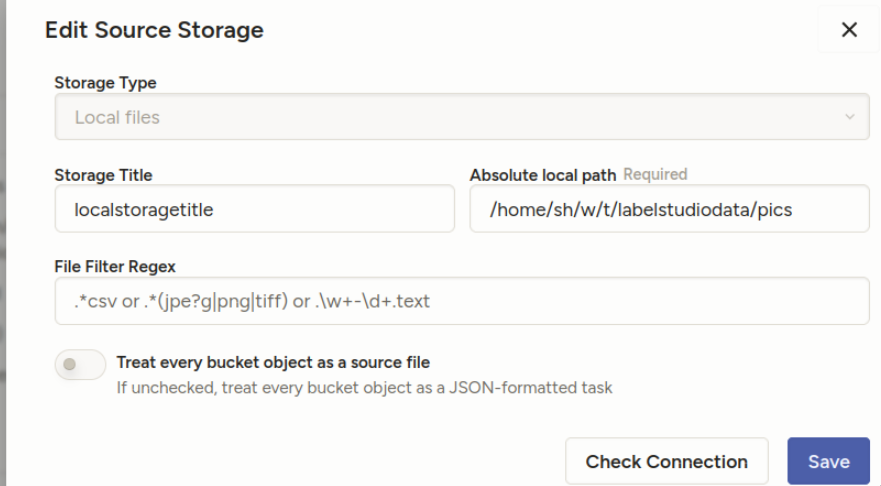
“Treat every bucket as source” should be unchecked — in the documentation, they describe it differently from the screenshots, but it’s equivalent:
- 8. Import method - select “Tasks” (because you will specify file references inside your JSON task definitions)
“Check connection” should tell you if everything’s OK.
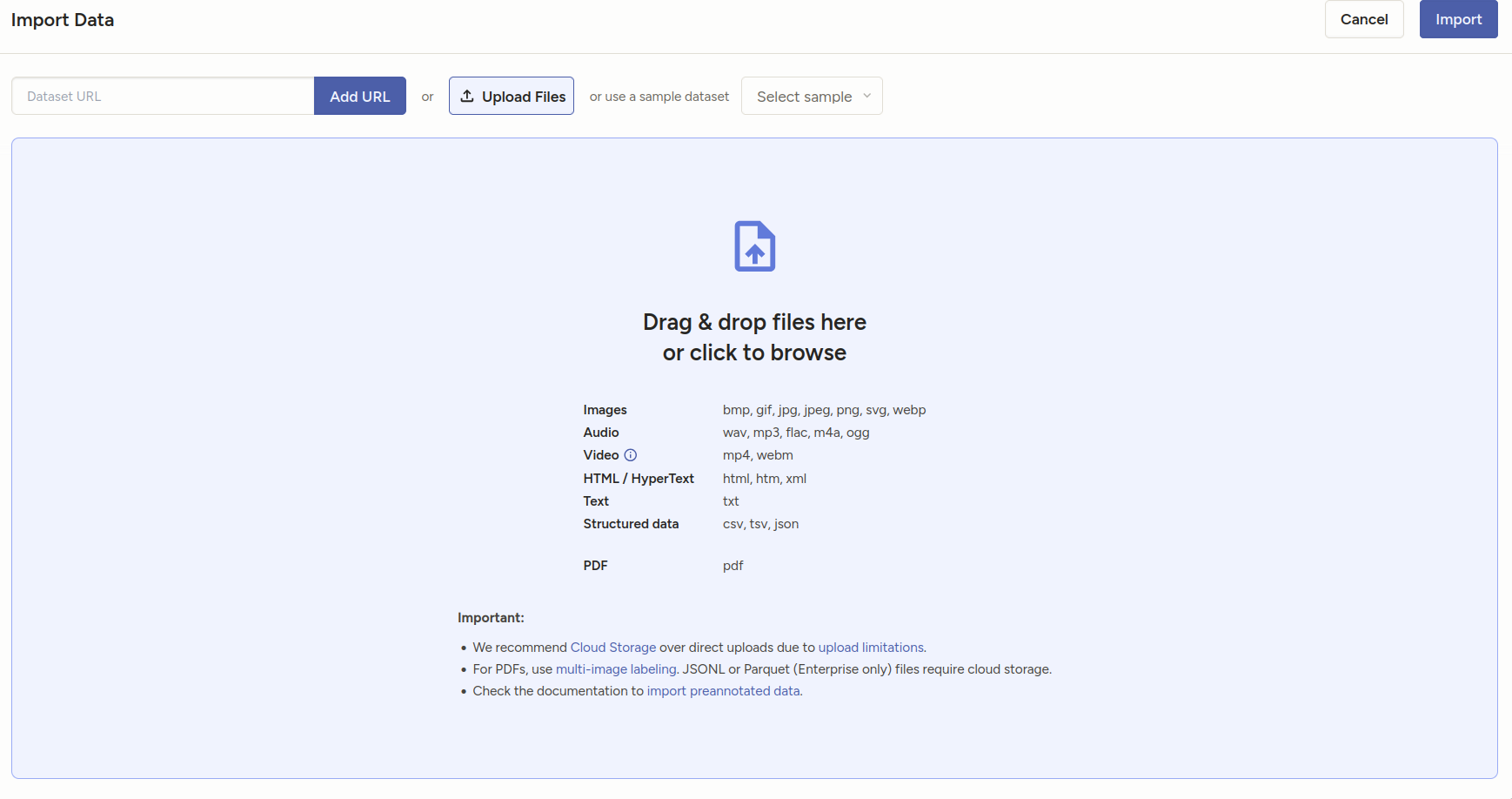
- DON’T sync the storage. Import the json you created from project import.
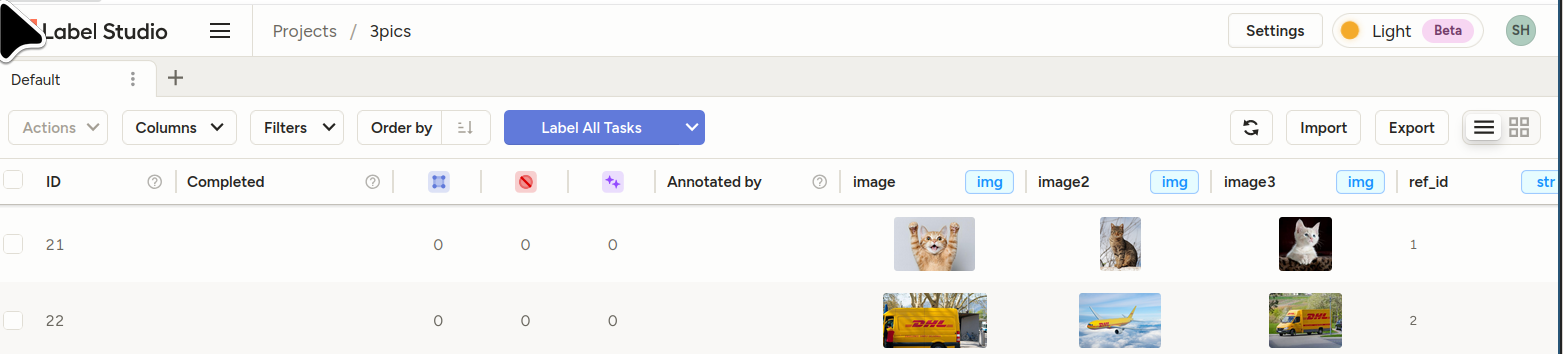
You should see your tasks.
- Bonus sample template for the above: []
<View>  <View style="display: grid;  grid-template-columns: 1fr 1fr 1fr; max-height: 300px; width: 900px">  <Image name="image1" value="$image"/>
  <Image name="image2" value="$image2"/>
  <Image name="image3" value="$image3"/>  </View>
  <Choices name="choice2" toName="image2">
    <Choice value="Adult content"/>
    <Choice value="Weapons"/>
    <Choice value="Violence"/>
  </Choices>
</View>